If you’ve ever felt like your ads are only as good as your creative pipeline, you’re not wrong.
For eCommerce brands, the problem is constant: winners fatigue, CPMs fluctuate and you need fresh hooks and variations every week just to hold performance. For local businesses, it’s a different kind of pressure: you may not need 100 new creatives a month but when you do need an ad (seasonal promo, event, limited-time offer), you usually need it fast and you don’t want to depend on an agency timeline.
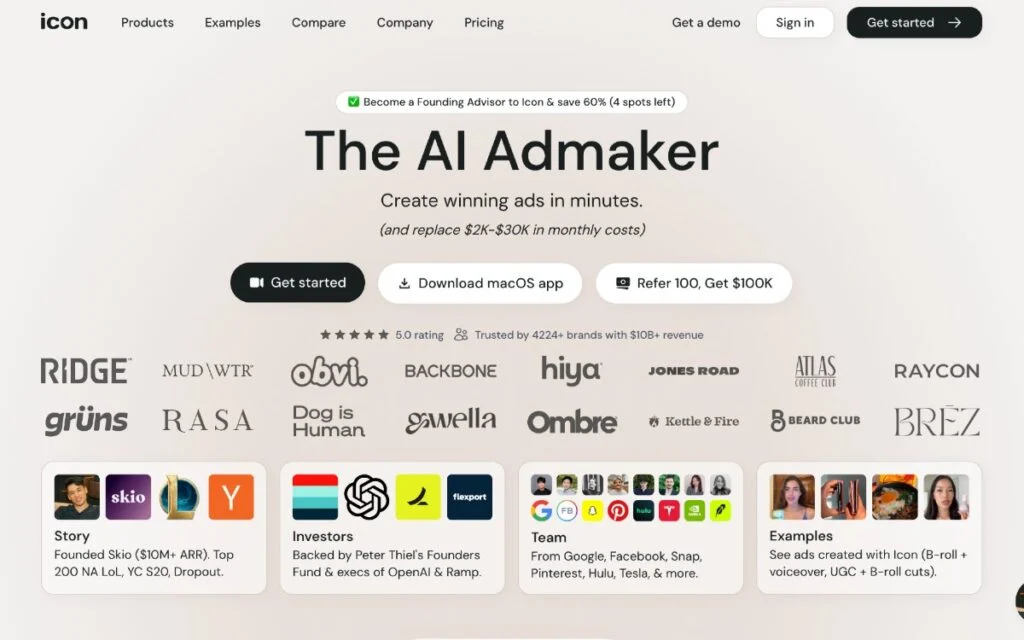
That’s where Icon.Me positions itself: an “AI Admaker” built to help you generate ad concepts, produce creatives, and iterate quickly in one workflow. Icon’s messaging is centered on helping you “plan, create & run 1000s of winning ads end-to-end” with a bundle of ad-creation features under one subscription.
This review is written with a positive, practical lens focused on what Icon.Me AI Admaker is best at where it fits in real-world workflows and how to get the most value from the platform during the 3-day free trial.
Quick Verdict
Icon.Me is compelling for speed and volume especially if you’re a solo marketer or a small team trying to generate lots of ad iterations fast. It bundles “14-products-in-1” with workflows for generating ads, editing, and ideation. Pricing starts around $39/month after a 3‑day free trial, but the plan mentions a limit of up to 10 ad downloads per month (while creation/edits are described as unlimited).
However, Icon.Me has notable reputation risk around billing/cancellation and product reliability based on public complaints. If you’re considering it treat the trial like a true test: create/export real assets, verify workflow stability and confirm how cancellation works for your account.
What Is Icon.Me AI Admaker?
Icon.Me (often referred to as “Icon”) is an AI-first ad creation platform that bundles multiple marketing-creative workflows into one workspace. The platform positions its system as an all-in-one set of tools for generating ad concepts, assembling video/static creatives and editing outputs so you can move from idea → iteration faster.
A key part of Icon’s positioning is that it combines multiple “products” into one subscription (it describes “14-products-in-1”), which is meant to reduce tool switching and speed up creative output.
Where Icon.Me Performs Best?
Fast creative throughput for performance marketing
If your strategy is built on testing (hooks, angles, iterations) a workflow tool that can crank out variations quickly can be valuable especially if you currently rely on freelancers or a slow internal pipeline.
All-in-one workflow (less tool switching)
Icon frames itself as an integrated environment: ideation → draft → edit → export (and even ad manager uploads/analytics in the broader positioning).
Who is Icon.Me AI Admaker Best For?
This AI Admaker tends to make the most sense if you are:
Best fit
- A solo founder / solo media buyer who needs “good enough, fast” creative volume
- A small eCom team producing weekly variations for TikTok/Meta
- An agency that wants quick iteration
Not ideal
- Brands with strict compliance/approval workflows
- Teams who need very high polish from the first export
- Anyone who cannot risk billing friction
Why Icon.Me Works Well for eCommerce Brands?

If you run paid social for eCom, you already know the “real” game:
- Creative volume beats perfect creativity.
- Winning hooks die quickly.
- Ad accounts reward consistent testing.
Icon is clearly designed to serve that reality by emphasizing rapid iteration and a workflow that takes existing assets and turns them into ad variations. It also highlights workflows like “AI CMO” and “AdGPT” as ways to generate ads that are partially or mostly complete and then refine if needed.
Icon has an official intro video:
Video: “Introducing Icon, The First AI Admaker” YouTube
Why Icon.Me Is a Good Fit for Local Businesses?
Local businesses don’t always need huge creative volume but they do need speed and simplicity.
Think:
- gyms and fitness studios promoting a “New Year” membership offer
- dentists running an “invisible aligners consult” lead-gen campaign
- restaurants promoting weekend specials
- realtors advertising an open house
- salons pushing a seasonal bundle
Icon’s “make ads quickly in one place” approach is attractive here because it can reduce the friction between “we should run an offer” and “the ad is actually live.”
Icon.Me AI Admaker Core Features That Matter for Advertisers
Below are the main building blocks Icon promotes and how they translate into outcomes for eCom and local advertisers.
14 tools in 1” ad creation suite
Icon markets a bundled workflow intended to replace a stack of creative + AI tools and streamline production.
AdGPT: From Script to “99% Done
Icon.Me doesn’t just give you a generic video; it uses “Completion Levels” to match your needs:
- Low Completion (0-30%): Great for brainstorming. It provides a script and a few rough B-roll suggestions. You do the heavy lifting.
- High Completion (80-99%): The “Holy Grail.” This includes a fully synced script AI voiceover, captions and precisely matched clips from your library or stock.
The Secret Weapon: Google Veo Integration
As of 2026, Icon.Me AI admaker has integrated Google Veo. This is a massive leap over standard avatar tools:
- Cinematic Realism: Veo allows you to generate high-fidelity, 4K-style b-roll that follows complex physics (like splashing liquid or realistic hair movement) that old AI tools used to struggle with.
- Better Branding: It follows your prompts more accurately ensuring your product doesn’t “hallucinate” or change shapes between scenes.
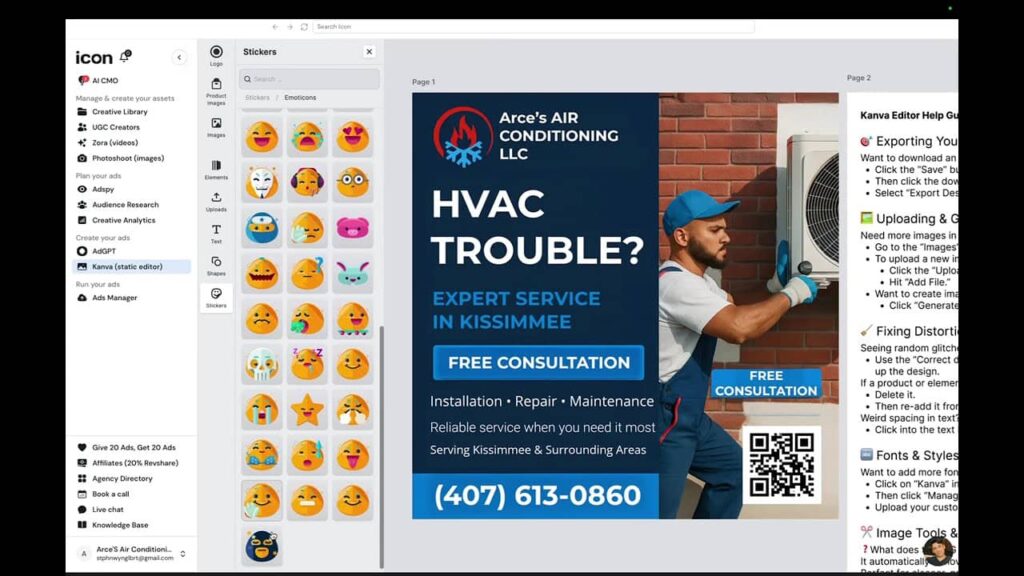
AI CMO: concept generation + “what to test next”
Icon’s “AI CMO” is positioned around generating ad concepts and creatives based on what’s working (including competitor-style inspiration and performance signals). In Icon’s own messaging it suggests AI CMO outputs ads that are “50–99% complete” and can be edited using their editing tools if needed.
Relevant reference link:
Video: “Introducing Icon, The First AI CMO (Chief Marketing Officer)” YouTube
AdCut + “Canvas” (editing)
Icon frames AdCut as its AI video editor for refining video ads. In Icon’s own copy, AdCut and Canvas are used to edit ads generated via AdGPT and AI CMO.
Pricing model designed for iteration
Icon’s pricing page states:
- $39/month after a 3-day free trial
- Unlimited ad creations, custom assets, & edits
- Up to 10 ad downloads per month
- Month-to-month billing, cancel anytime
- Money-back guarantee messaging
That structure tends to reward the teams who work like performance marketers:
- generate many variations
- narrow down to a few winners
- export the finalists
Icon.Me Pricing: Plans, Limits and What’s Included
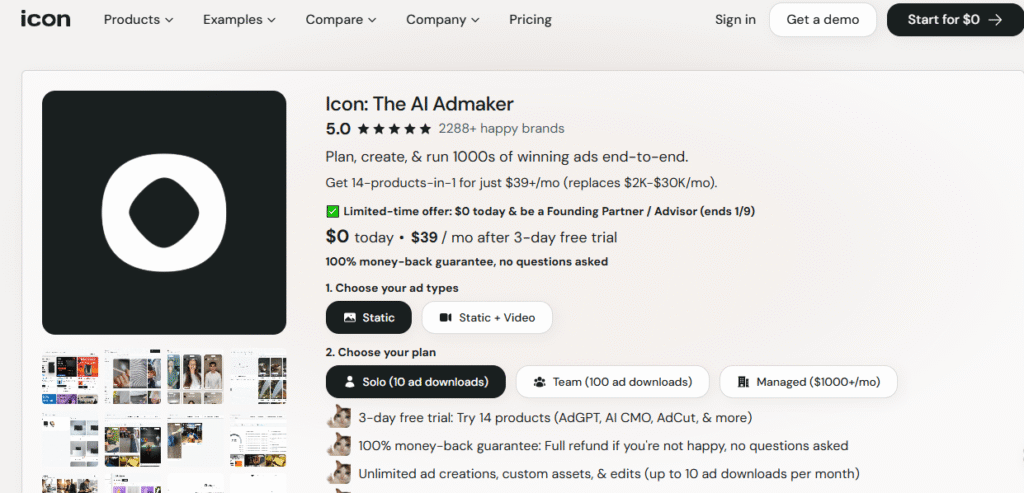
Icon’s pricing page is straightforward about the entry point:
- $0 today
- $39/month after a 3-day free trial
The Fine Print: Pricing “Gotchas”
While Icon.Me AI Admaker markets itself as a replacement for $2K–$30K/mo in tools, the $39 entry plan has a specific bottleneck:
- The Download Cap: You only get 10 downloads per month. For performance marketers who need to test 20 hooks to find one winner this is tight.
- Scaling to “Team”: If you need true volume you’ll likely need the Team Plan (approx. $399/mo), which typically jumps your limit to 100+ downloads.
- Trial Strategy: Treat your 3-day trial as a “sprint.” Create everything but only hit “Download” on the assets you are 100% ready to run.
How to Use Icon.Me for Paid Ads (Step-by-Step)
Here’s a practical way to frame Icon Ai Admaker in your blog so readers can picture the workflow quickly.
Step 1: Gather your raw assets (or links)
For eCom brands, this usually means:
- UGC clips (even if they’re imperfect)
- product demos
- review/testimonial snippets
- lifestyle content
- product photos
For local businesses, it’s often:
- quick phone-shot videos of the location
- before/after (where allowed)
- promo graphics
- staff/culture clips
- service “walkthrough” clips
Step 2: Use Icon to generate variations (not just “one ad”)
The highest ROI move with tools like Icon is to create:
- multiple hooks
- multiple opening scenes
- multiple angles (offer, problem/solution, social proof, urgency)
Step 3: Refine only what needs refining (speed stays intact)
Instead of editing from scratch the goal is:
- fix pacing
- swap a scene
- tighten on-screen text
- adjust structure
Step 4: Export the winners (protect your download cap)
Because Icon’s pricing page mentions a limit on monthly downloads at the entry tier the best practice is:
- iterate and preview internally
- export only what you’re ready to actually test live
Best Alternatives to Icon.Me AI Admaker
If Icon doesn’t feel stable enough you can look at other AI ad creation options.
Creatify— AI video ad generator (URL-to-ad speed + avatars)
Pricing
- Free plan: $0 (includes 10 credits/month, exports have a watermark)
- Starter: $19/month
- Pro: $49/month
Key features
- AI video ads from product URLs (“Generate engaging video ads for your products from any URL”)
- UGC-style video + AI avatars: large avatar libraries and voices are described; supports multiple aspect ratios
- Editing: includes “AI Editing” and an AI video editor in plan comparisons
- Integrations: Pro mentions launching ads to Meta & TikTok
- AdMax (on Enterprise): positioned as an all‑in‑one performance suite including creative research, optimization, analytics, bulk creation, etc.
Airpost— managed AI + human creative team
Pricing
- Starting at $8,000 USD/month
Key features
- Managed service: “custom model” + “dedicate a custom AI video team” for your brand
- Provides 10–100+ strategically developed video ads to test in multiple styles/angles/personas
- Includes a platform to control brief + edits, plus help with uploads into Meta and other accounts
Tagshop— AI UGC-style video ad generator
Pricing
- Free plan: $0 (includes limited credits, 1 short video, 720p export with watermark)
- Starter: $11/month (up to ~60 videos/year, no watermark, higher resolution)
- Growth: $39/month (more credits, faster generation, additional avatars)
- Scale: $99/month (highest limits, AI Twins, priority speed, dedicated support)
Key features
- Generate creator-style ads by pasting a product URL and selecting an avatar, script angle and offer.
- Automatically generate scripts focused on hooks, benefits, objections, social proof and urgency
- Clone voices and translate ads into 200+ languages, making it useful for international campaigns and localization
- Export ready-to-run ads for Meta, TikTok and YouTube in standard aspect ratios
Comparison Table: Icon vs Creatify vs Tagshop vs Airpost
| Tool | Model Type | Best For | Price |
| Icon.Me | All-in-One | Solo Ops & Local Biz | $39/mo |
| Creatify | URL-to-Video | Catalog/Shopify Sellers | $19/mo |
| Tagshop | UGC Avatars | TikTok-first Brands | $29/mo |
| Airpost | Managed AI | High-Spend Agencies | $8,000/mo |
Conclusion: Should You Use Icon.Me for Paid Advertising?
If you want speed and ad volume and you’re comfortable testing tools aggressively, Icon.Me Ai Admaker can be worth a trial especially at the entry price point and with the promise of bundled workflows.
Try Icon.Me’s 3-day trial: If your biggest bottleneck is creative speed (or you’re tired of waiting on designers for every new promo) the simplest next step is to test Icon in a real workflow.
FAQs
What’s the fastest way to test Icon.Me in 3 days?
Use the trial like a sprint:
- Day 1: load assets + generate 10+ variations
- Day 2: refine your top 3–5
- Day 3: export only the winners you’ll run live
Is Icon.Me Ai Admaker legit or a scam?
Icon.Me is a legitimate AI ad creation platform used by real marketers and brands. However, some users report issues with billing, cancellation and product stability. It’s not considered a scam, but it’s best to test the platform carefully during the free trial before committing to a paid plan.
Does Icon.Me actually create ads automatically?
Icon.Me can generate ad concepts, scripts, visuals and draft videos using AI, but most users still need to review, edit and refine outputs before running them. It works best as a creative accelerator not a fully hands-off ad solution.
Is Icon.Me good for Meta, TikTok, and YouTube ads?
Icon.Me Ai Admaker is designed primarily for paid social platforms like Meta and TikTok with formats and workflows optimized for short-form video and static ads. Results vary depending on how much manual editing and testing you apply before launching campaigns.
Can Icon.Me replace my creative team or freelancers?
For basic ad variations and early testing Icon.Me can reduce reliance on freelancers. However, most teams still need human input for strategy, brand voice, compliance and performance optimization. It’s better viewed as a support tool not a full replacement.
Should I try Icon.Me or choose an alternative first?
If budget is tight and speed is your priority Icon.Me can be worth testing. If you value stability, predictable billing and polished creative output you may want to compare alternatives before committing long-term.
The PROAIBOX Power User Strategy
To get the highest ROI from Icon.Me, our team recommends the “Internal Soft-Test” workflow:
- Mass-Produce: Use AdGPT to generate 20–30 variations of your ad.
- Preview, Don’t Download: Use Icon’s internal player to review them all.
- The PROAIBOX Filter: Share the internal preview links with your team or run the scripts through your AI Marketing Advisor.
- Export the “Top 5”: Only use your 10 monthly download credits on the absolute strongest performers. This effectively doubles your testing capacity without forcing you into the $399 plan.