
Co‑development software is a class of digital platforms that allows multiple individuals or teams to work together on shared projects in real time. These tools provide coordinated environments where developers can write, edit, test, and maintain code collaboratively. Unlike traditional isolated development workflows, co‑development software integrates communication, version control and joint editing into one system. This integration makes it easier for teams to interact directly on the same codebase without delays or conflicting changes.
Understanding co‑development software matters because modern software projects are rarely built by one person. Distributed teams, remote contributors and cross‑functional groups need structured tools that eliminate confusion. A co‑development environment helps ensure that everyone is working with the latest code, can trace changes easily and can coordinate complex tasks without manual file sharing. For organizations adopting agile practices or continuous delivery, reliable collaborative platforms are fundamental to maintaining velocity and quality.
Co‑development software is commonly used in professional development teams, open source communities, educational settings and DevOps workflows. In these scenarios, the software acts not only as a shared editing space but also as a hub for planning work, tracking issues, reviewing changes and deploying updates.
By centralizing these functions, teams reduce overhead and improve transparency. Whether a team is building a mobile app, a cloud service or an enterprise platform, co‑development tools support continuous collaboration and shared accountability.
What Co‑Development Software Is and How It Works

Co‑development software brings together multiple capabilities into a single platform so that team members can work harmoniously. At its core, it includes version control which tracks every change made by every participant. This means that if one developer updates a file while another is working on a related feature, the system records both changes, preserves history and resolves conflicts. This mechanism prevents lost work and makes collaborative coding predictable.
Additionally, co‑development environments often incorporate real‑time editing, shared terminals, and built‑in communication features. Real‑time editing allows contributors to see each other’s updates instantly, reducing the need for separate messaging tools.
Shared terminals and environments let developers run and test code collaboratively. Built‑in chat or comment systems let teams discuss issues directly where the code lives, streamlining coordination and minimizing context switching between platforms.
Version Control as the Foundation of Collaboration
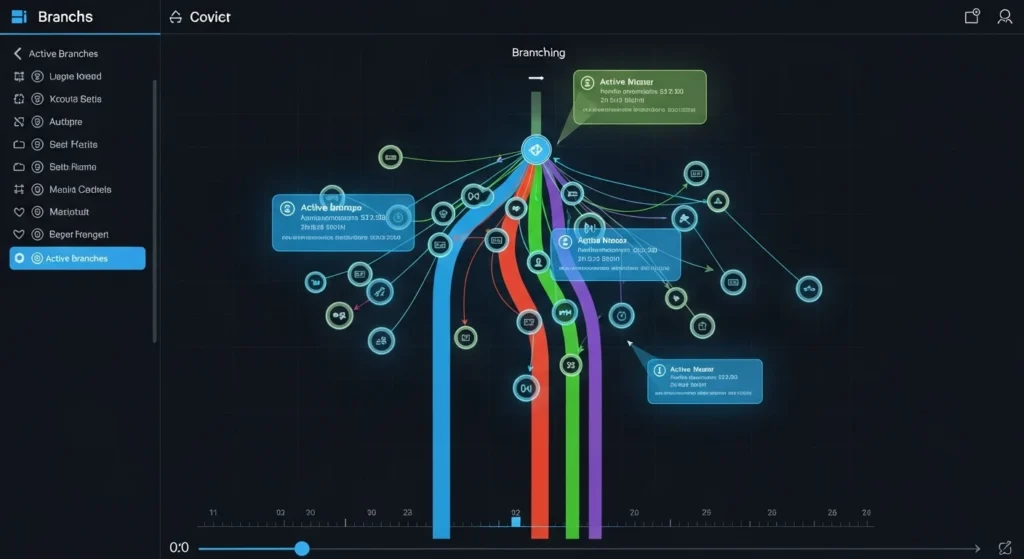
Version control is the backbone of co‑development software. It acts as a detailed ledger that captures every change made to a project. When developers commit updates, the version control system saves a snapshot of the project state. This lets teams revisit earlier versions, understand how work evolved over time and undo changes safely if needed. It also enables branching workflows where parallel efforts can proceed without interference.
Beyond simply storing changes, version control plays a central role in team alignment. Workflow models like feature branches and pull requests give structure to how contributions are proposed, reviewed and integrated. These mechanisms help teams maintain stability in main codebases while still encouraging innovation.
For large projects with many contributors, version control not only protects code integrity but also clarifies responsibility and progress at every stage of development.
Real‑Time Editing and Synchronous Collaboration
In traditional software workflows, developers edit code on their own machines and merge changes later. Real‑time co‑development software eliminates this delay by allowing multiple people to work on the same code simultaneously, similar to shared document editors. This capability is particularly valuable when teams need to debug complex issues together, onboard new team members or coordinate training sessions.
Real‑time editing also fosters inclusivity in distributed teams. When participants can see live updates from colleagues in different locations, the sense of shared ownership increases. Teams no longer need to wait for meetings to discuss code; they can work through problems as they arise. This reduces feedback loops and accelerates shared understanding, which is critical for high‑performing engineering groups.

Integrated Communication and Feedback Loops
Effective co‑development software tightly integrates communication features within the development environment. Instead of using separate messaging tools, developers can comment on specific lines of code, ask questions or suggest changes right where the work happens. These in‑context discussions help reduce misunderstandings and keep conversations directly tied to particular technical contexts.
Integrated communication also means that feedback loops are shorter. When a teammate raises a concern or recommends an improvement, the recipient can act on it immediately without switching tools or hunting through external chat logs. For teams practicing code review or peer assessment, this integration improves quality and lowers the cognitive load of tracking separate threads of communication.
Supporting DevOps and Continuous Delivery
Co‑development software supports DevOps practices by connecting collaboration with automated testing and deployment pipelines. Many platforms allow teams to link commits to build systems, test frameworks and deployment tools. This means that once code changes are approved, tests are triggered automatically and, if successful, updates can be deployed faster.
By aligning development collaboration with continuous delivery, teams reduce bottlenecks and increase predictability. Issues are discovered earlier in the process, and feedback from automated systems informs development decisions quickly.
This tight coupling of collaboration and operational tooling is a key reason why co‑development environments are popular in modern software organizations striving for frequent releases without sacrificing quality.
Security and Access Control in Co‑Development Platforms
Security is a critical consideration in shared development environments. Co‑development software provides fine‑grained access control so that teams can define who can view, edit or approve changes. Role‑based permissions help minimize risk by ensuring that sensitive parts of a project are only modified by authorized contributors. This structure is especially important in regulated industries or large enterprises with strict compliance requirements.
In addition to access control, these platforms often include audit logs, encryption, and integration with enterprise identity systems. Audit logs help track who made which changes and when, which is valuable for compliance and troubleshooting. Encryption protects data in transit and at rest. Identity integrations let organizations leverage existing authentication policies, ensuring secure and seamless access for team members.
Typical Use Cases of Co‑development software Across Industries
Co‑development software is not limited to traditional software engineering teams. Educational institutions use it to teach programming collaboratively, allowing instructors and students to work together in a shared environment. In research settings, cross‑disciplinary groups use these tools to jointly develop simulations, experiments, and data analysis scripts.
In businesses beyond tech, co‑development tools support projects that require technical customization, such as automation scripts, internal tools and integrations with third‑party systems. The ability to coordinate edits, discuss changes, and maintain clear version history makes these tools valuable wherever structured collaboration on code is necessary. Their flexibility and transparency support diverse workflows and team structures.
Challenges in Implementing Co‑Development Workflows
While co‑development software offers many benefits, implementing it effectively requires thoughtful process design. Teams need clear conventions for branching, merging, code review responsibilities and conflict resolution. Without agreed practices, shared environments can become chaotic, leading to integration issues or duplicated work.
Training and onboarding also matter. Teams must understand how to use version control properly, how to leave meaningful comments, and how to integrate automated workflows. Organizations new to collaborative coding may need to invest in learning and change management to realize the full value of these platforms. Thoughtful adoption, rather than simply installing tools, ensures that the software enhances productivity rather than adds friction.
Choosing the Right Co‑Development Software
Selecting the right co‑development software depends on team size, project complexity, integration needs, and existing toolchains. Key considerations include how well the platform integrates with version control and CI/CD systems, the quality of its collaboration features, and its support for automation. Scalability and security are also important, particularly for enterprise teams with regulatory obligations.
Teams should evaluate platforms based on real workflows rather than feature checklists alone. Pilots or trials can reveal how easily the software fits into daily routines and whether it supports desired practices such as code review and automated testing. Feedback from actual users developers, testers and operations staff can guide decisions that ensure long‑term value.
Best Practices of Co‑Development Software for Team Collaboration
Successful use of co‑development software is grounded in good collaboration practices. Teams should establish clear communication norms, define how code reviews are conducted, and decide how conflicts will be resolved. Documenting these practices in a shared guide ensures that all contributors understand expectations and responsibilities.
Regular checkpoints, such as daily standups or review sessions, help align efforts and address issues early. Tracking metrics like build success rates, review turnaround time, and deployment frequency also provides insights into how collaboration is performing. By combining strong tools with intentional habits, teams can enhance coordination and sustain long‑term productivity.

Future Trends in Collaborative Development
The landscape of co‑development software continues to evolve. Emerging trends include deeper integrations with artificial intelligence to assist with code suggestions, automated refactoring, and smart conflict resolution. These advancements aim to reduce manual effort and enable teams to focus more on creative problem‑solving rather than routine tasks.
Another trend is the expansion of browser‑based environments that allow contributors to work without installing local development setups. This can simplify onboarding and make collaboration more accessible across devices.
As work becomes more distributed, co‑development tools will likely emphasize flexibility, real‑time interaction, and seamless integration with diverse project pipelines.
Conclusion
Co‑development software transforms how teams build and maintain code by centralizing collaboration, version control and communication within shared environments. It empowers distributed teams to act with clarity and cohesion, reducing delays and improving transparency across projects.
Implementing co‑development tools effectively requires not only adopting the right software but also establishing aligned practices around reviews, communication and process governance.
As digital work continues to evolve, co‑development software will remain a cornerstone of productive engineering and cross‑functional collaboration. By focusing on shared visibility, real‑time interaction and seamless integration with operational tooling, teams can navigate complexity with confidence and build better software together.
FAQs
What distinguishes co‑development software from traditional version control systems?
Co‑development software builds on version control by adding real‑time collaboration, integrated communication, and shared editing environments. Traditional systems focus on tracking changes, while co‑development platforms enable simultaneous teamwork and enhanced coordination.
Can co‑development software be used for non‑software projects?
Yes. Any project that involves structured text, scripts, or technical artifacts can benefit from collaborative platforms. Teams working on documentation, infrastructure code, or research scripts often use these tools to coordinate efforts and maintain consistency.
How does real‑time editing improve team workflows?
Real‑time editing lets contributors see each other’s changes instantly, reducing delays and misunderstandings. This capability helps teams debug together, share knowledge faster and make decisions without waiting for separate merge cycles.
Is co‑development software secure for commercial use?
Most enterprise‑grade co‑development tools include robust security features such as role‑based access control, encryption, and audit logs. These protections help meet compliance requirements and safeguard codebases from unauthorized changes.
Do teams still need meetings when using co‑development software?
Yes. While the software reduces the need for some meetings by enabling asynchronous communication, structured check‑ins like planning sessions and reviews help maintain alignment and address blockers collaboratively.
How do automated testing and CI/CD fit into co‑development workflows?
Automated testing and CI/CD integrate with co‑development platforms to validate changes as they are made. This integration ensures that code meets quality standards before deployment, shortens feedback loops, and supports continuous delivery practices.




One Comment